⚠️ Prototype: This system is still in early testing. Domain addresses (bersama.wenjyue.com, bersama-admin.wenjyue.com) may change in future. Always check this manual for the latest links.
Jump to
🌐 Site Addresses
| Who | Address | Purpose |
|---|---|---|
| 👤 Resident (rakyat) | bersama.wenjyue.com | Submit a complaint & check status — no login needed |
| 🙋 Volunteer / 🔑 Admin | bersama-admin.wenjyue.com | Backend to manage complaints and assign volunteers |
| 🙋 New volunteer | bersama.wenjyue.com/user.html | Register as a volunteer (Volunteer tab) |
| 📖 This manual | bersama-manual.wenjyue.com | You are here — share this link with the team |
🔐 Beta Login Credentials
🔑 Admin
Usernameadmin
Passwordadmin123
Full access — sees all complaints
🙋 Volunteer 1
Usernamevol1
Passwordvol123
Ahmad Razif — sees only his cases
🙋 Volunteer 2
Usernamevol2
Passwordvol123
Lim Mei Ling
👤 Demo Resident
Phone60123456789
Passworddemo123
Has 5 demo complaints to show
Beta only. These are test accounts. Change or remove all passwords before public launch.
How to File a Complaint
1
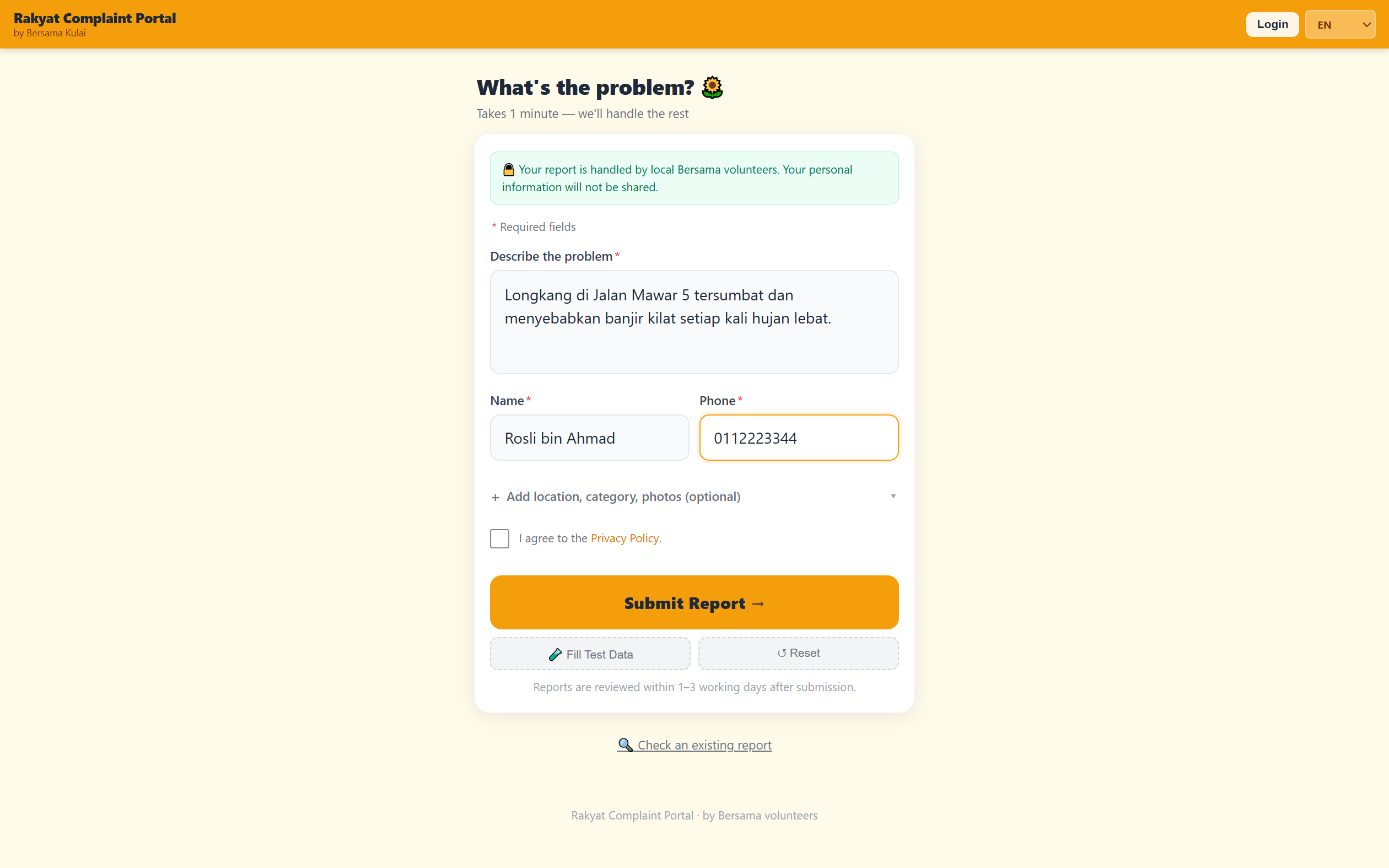
Go to bersama.wenjyue.com and describe the problem
Type what the problem is (e.g. "Longkang tersumbat di Jalan Mawar, banjir kilat setiap hujan").
Then fill in your Name and Phone number. That is all that is required.
💡 Want to add more detail? Tap + Add location, category, photos to attach a photo, GPS pin, or problem category.
2
Tick the privacy box and press Submit
Check "I agree to the Privacy Policy" then press Submit Report →.
Your report goes directly to a Bersama volunteer.
Language selector (EN / BM / Bahasa Cina / Tamil) is at the top right.
3
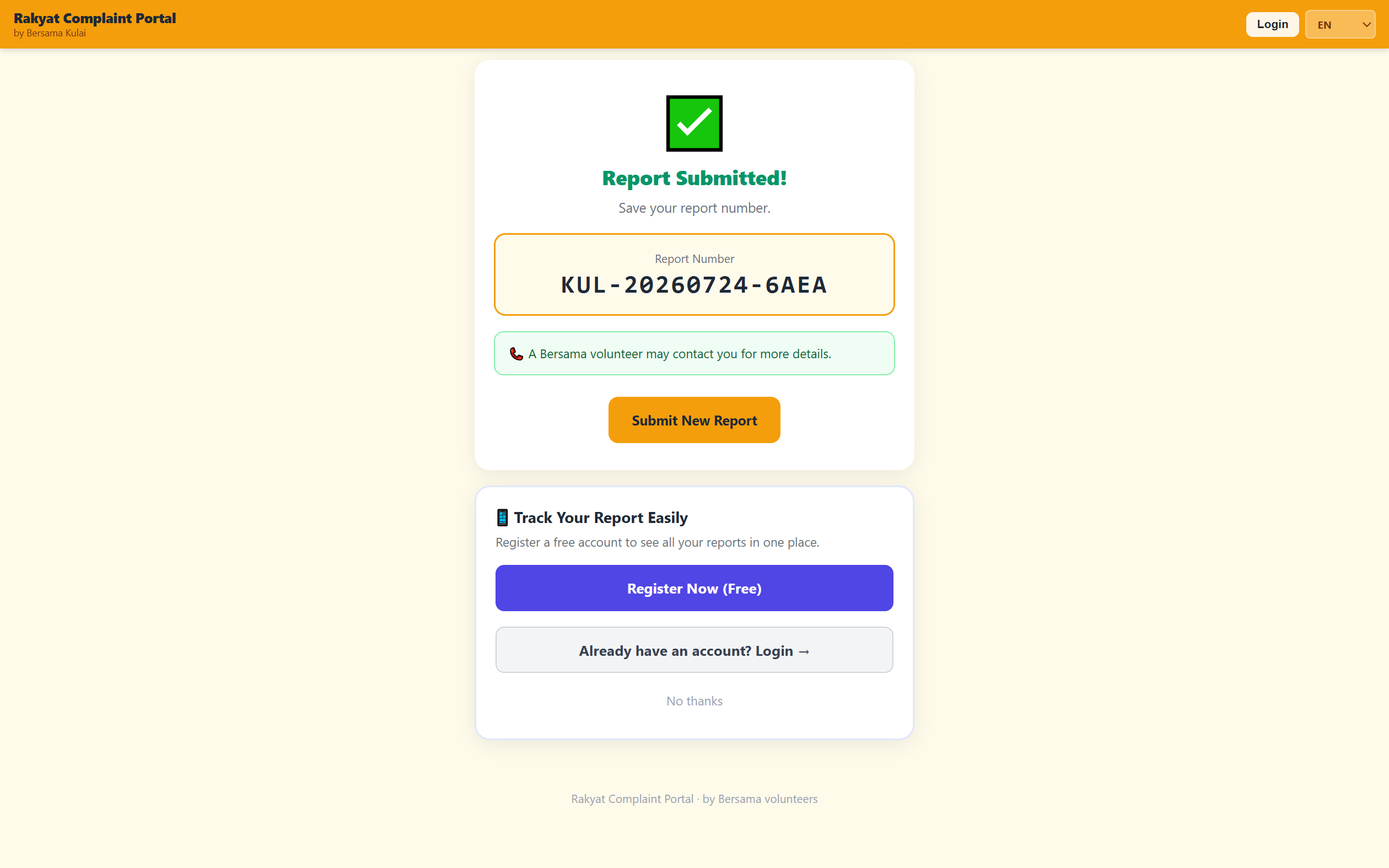
Save your Report Number and track progress anytime
Your report number looks like
KUL-20260724-6AEA. To check progress later:
go to bersama.wenjyue.com, tap Check an existing report,
enter the number and press Check. No login required.
✓ Optional: register a free account at bersama.wenjyue.com/user.html to see all your past complaints in one place under My Complaints.
How to Register and Work Cases
4
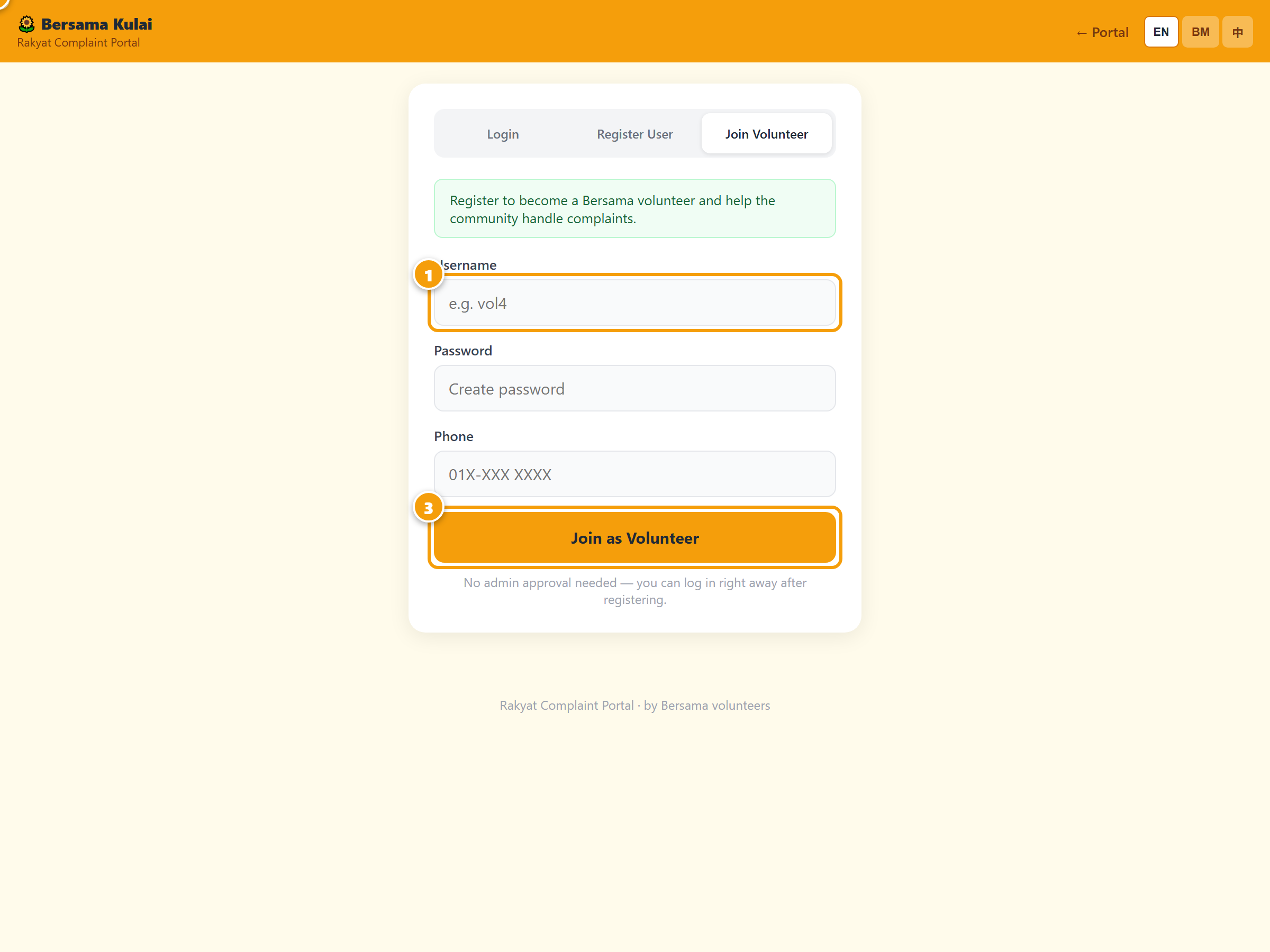
Register as a volunteer
Go to bersama.wenjyue.com/user.html
and open the Volunteer tab. Pick a username, password and enter your phone number.
Press Join as Volunteer.
✓ Your account is active immediately — no admin approval needed. You can log in right away.
5
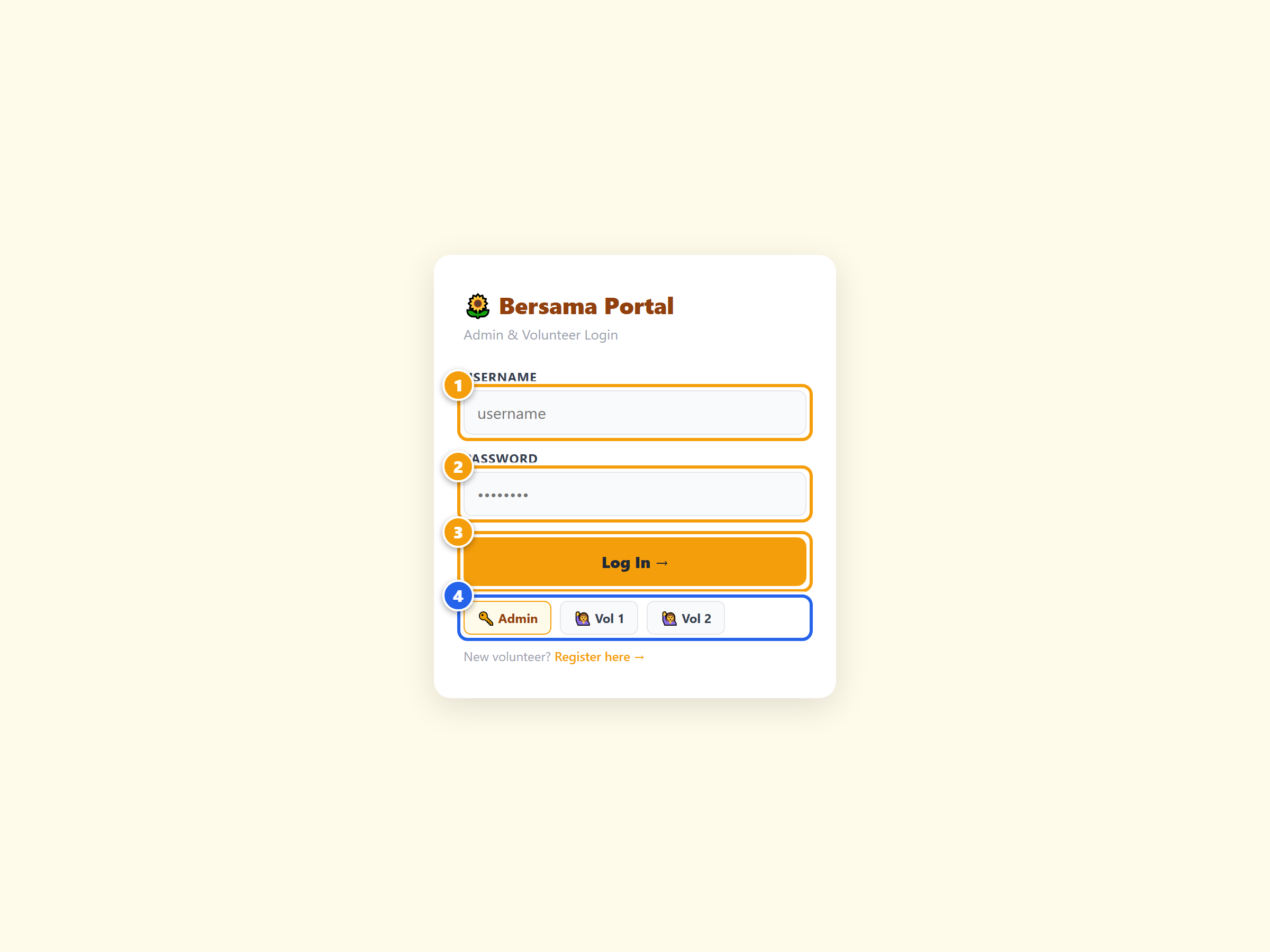
Log in at the admin portal
Go to bersama-admin.wenjyue.com.
Enter your username and password, then press Log In →.
For the demo, tap the 🙋 Vol 1 quick-login button.
First-time volunteers may see a "Complete Your Profile" pop-up — fill in your name and phone so admin knows who you are, or tap Skip.
6
Work through your assigned cases
You will only see My Assigned Reports — the cases the admin gave you.
Use the action buttons on each row, in order:
✓ Read — you have read it
📞 Contact — you called the resident
🏭 SISPAA — enter SISPAA ref no.
✓ Done — case resolved
Tap the 📝 icon to add an internal note (not visible to the resident).
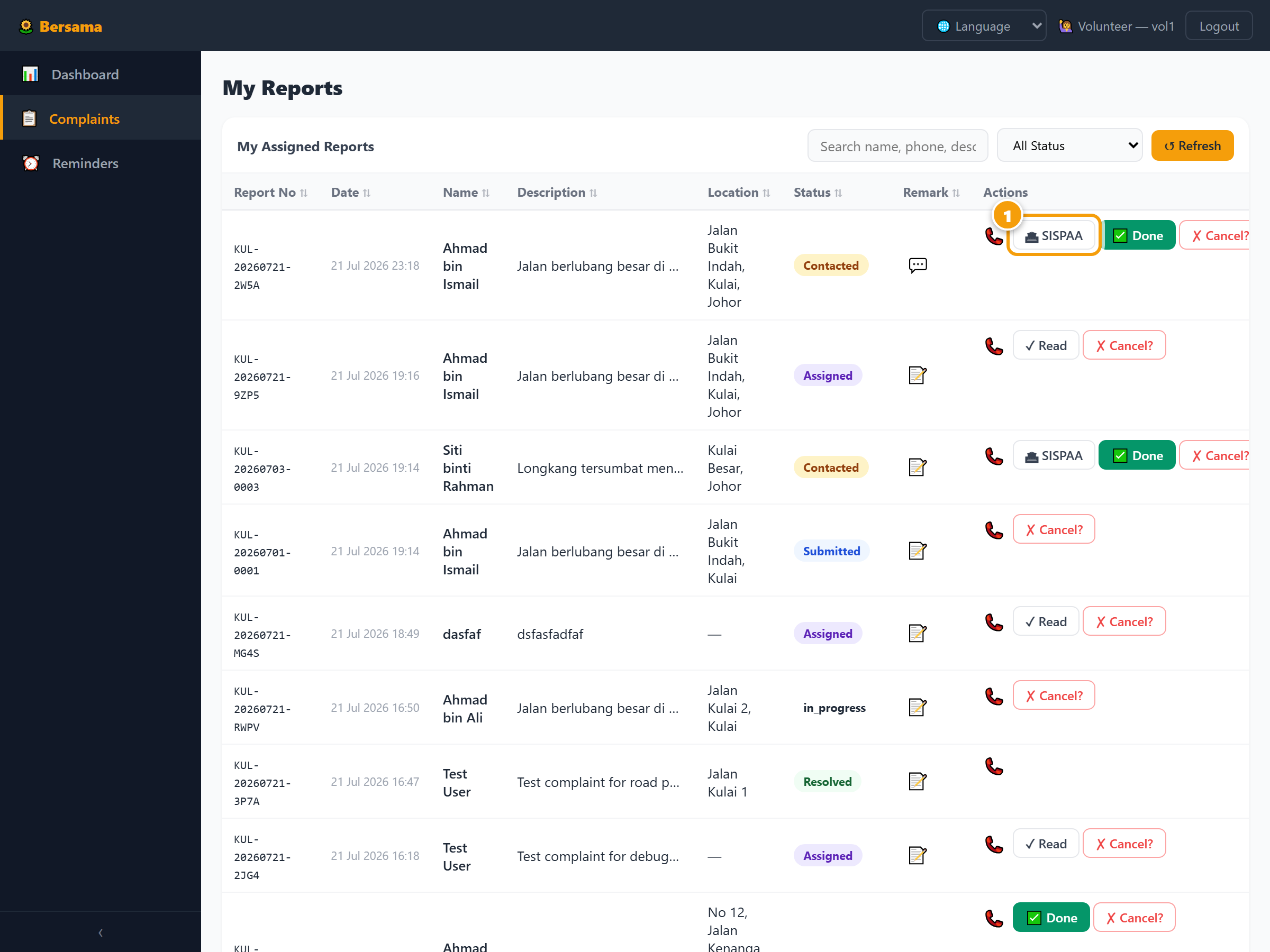
Volunteers cannot see other volunteers’ cases or the full complaint list. Only admin has full visibility.
How to Manage Complaints and Volunteers
7
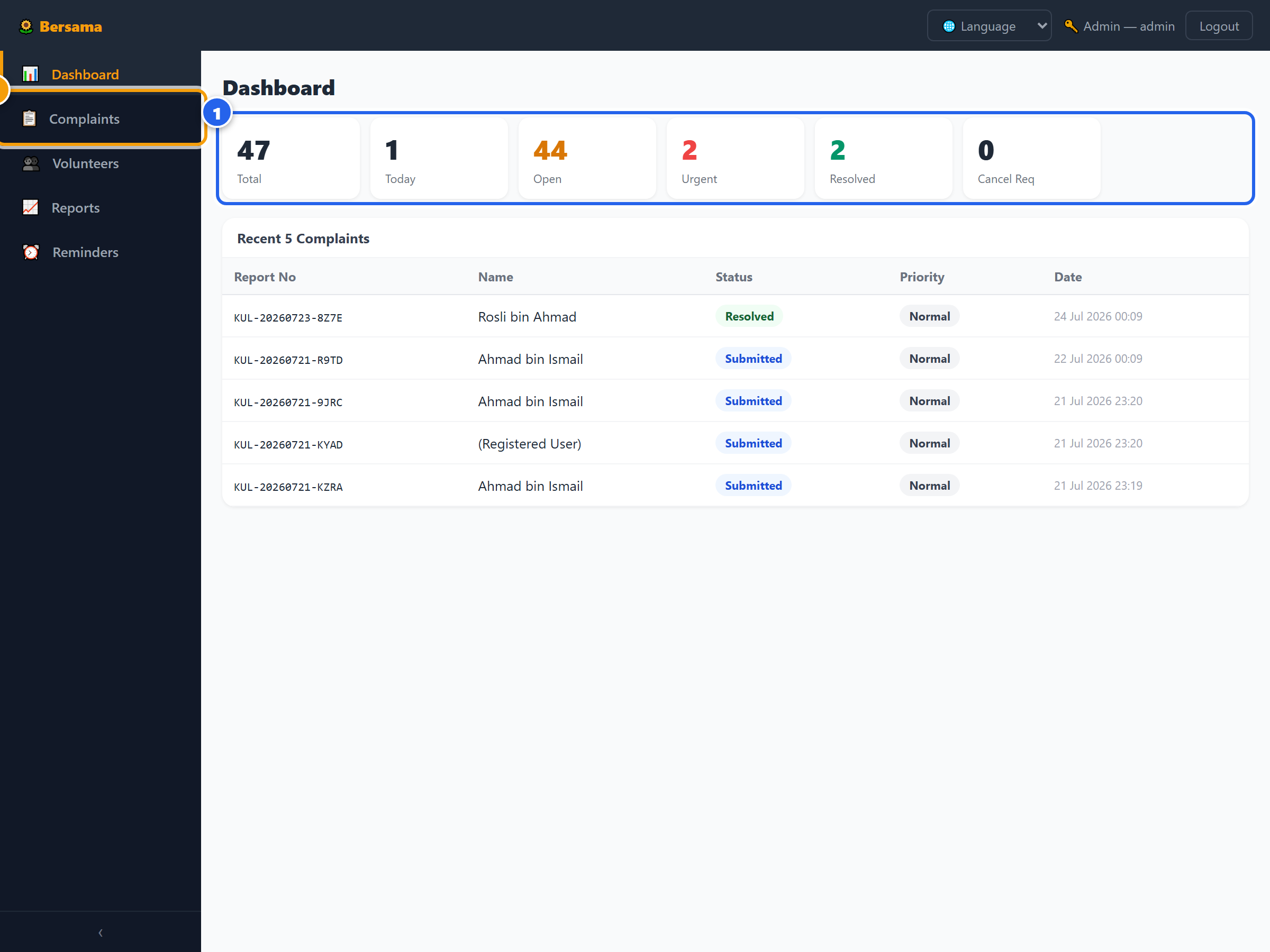
Log in and check the Dashboard
Go to bersama-admin.wenjyue.com
and log in as
admin / admin123 (or tap 🔑 Admin).
The Dashboard shows six stat tiles: Total / Today / Open / Urgent / Resolved / Cancel Requests.
A red banner appears if any cancellation requests need approval.
8
Assign a complaint to a volunteer
Open Complaints in the left menu. Find a new complaint with status
Submitted. In the Assigned To column,
select a volunteer from the dropdown. The status automatically changes to
Assigned and the case appears in that volunteer’s list.
📱 A WhatsApp message template is auto-generated — tap 📲 to notify the volunteer directly.
9
Mark urgent cases and handle cancellations
Click the ⚪ button in the Priority column to toggle a complaint to 🔴 Urgent.
A WhatsApp alert template is generated for the volunteer.
For cancellation requests: a yellow banner on the Dashboard shows how many are pending —
review and click Approve Cancel or leave open.
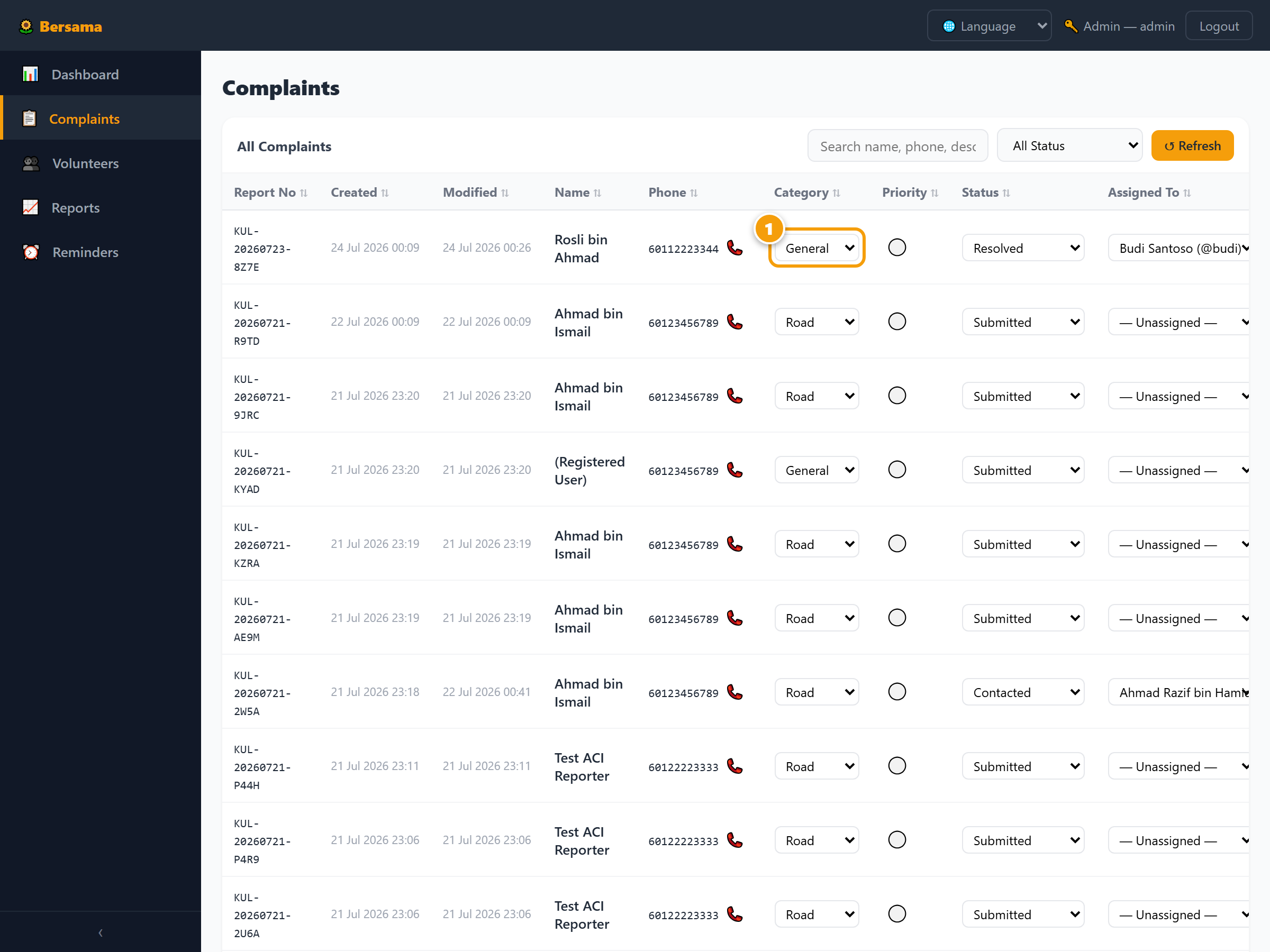
✓ Admin tip: Use the search bar on the Complaints page to find by name, phone or report number.
Volunteer Stats (in Reports menu) shows how many cases each volunteer has handled.
🚦 Status Badge Reference
| Badge | Meaning | Set by |
|---|---|---|
| Submitted | Resident filed the complaint — waiting for triage | System (automatic) |
| Assigned | Admin assigned it to a specific volunteer | Admin |
| Read | Volunteer has acknowledged and read the complaint | Volunteer |
| Contacted | Volunteer has called or messaged the resident | Volunteer |
| SISPAA Submitted | Filed on the official SISPAA portal (ref number saved) | Volunteer |
| Resolved | Issue fixed and closed ✓ | Volunteer |
| Cancelled | Complaint withdrawn (admin approval required) | Admin |
❓ Why This System Exists
Malaysia already has official complaint channels — SISPAA (run by KPKT and local councils), the MPKJ portal, and MyGovPortal / e-Aduan. So why build another one?
The honest answer: most residents never reach those portals. Registration requirements, BM-only forms, poor mobile experience, and no follow-up guarantee filter out the very people most affected by drainage floods, broken streetlights, and pothole roads — the elderly, rural communities, and those who are not digitally literate.
What this portal does differently:
| Factor | SISPAA / MPKJ | Bersama Portal |
|---|---|---|
| Submission friction | High — registration + 10 fields | 3 fields, no login |
| Languages | BM only | EN / BM / 中文 / Tamil |
| Mobile-friendly | Limited | ✓ Mobile-first |
| Who files officially | Resident alone | Volunteer does it on your behalf |
| Human follow-up | None guaranteed | Volunteer calls + files SISPAA ref |
| Tracking | Login required | Report number, no login needed |
This portal is a bridge, not a replacement. Every complaint filed here is eventually submitted to SISPAA by a Bersama volunteer — so it enters the official pipeline. We just remove the barrier that stops most residents from ever getting there.
Government links for volunteers — SISPAA ↗ · MPKJ Portal ↗ · MyGovPortal / e-Aduan ↗